
Practical guide
How to use the Exit Mode Buyer Readiness plugin in ChatGPT
Use Exit Mode in ChatGPT for valuation, readiness and planning. Learn how members unlock deal comparables and sector multiples with a connected account.
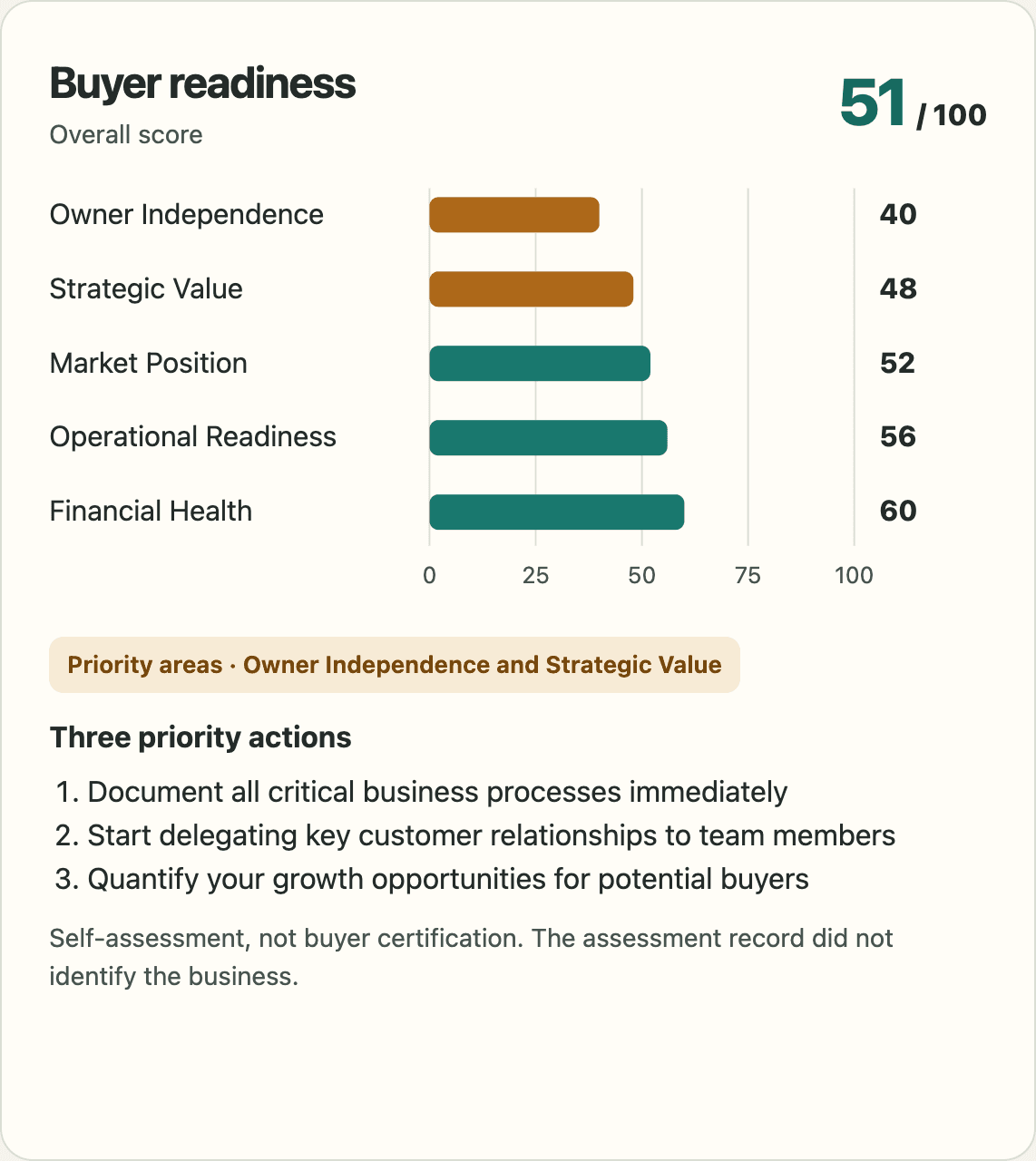
Exit Mode Buyer Readiness brings four practical exit-preparation tools into ChatGPT: an indicative business value estimate, a buyer-readiness assessment, a 90-day action plan and published acquisition research. You can ask questions about the results in the same conversation, rather than copying figures between a calculator and a chat window.
The plugin is published by Exit Mode Ltd. Its four public tools do not require an Exit Mode account or purchase. ChatGPT account, workspace and regional availability still apply. Two additional read-only features are available to eligible existing Toolkit or Academy members who choose to connect their Exit Mode account.
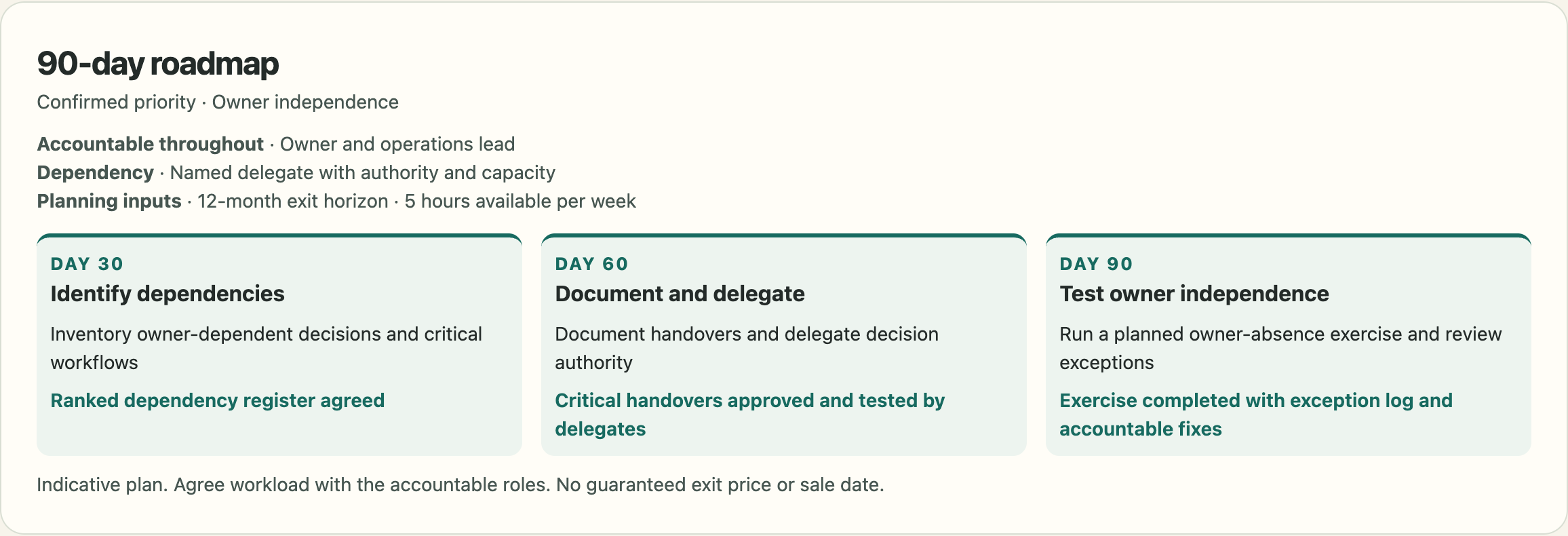
This guide shows where to install it and gives you prompts for each job. The header chart and roadmap example are rendered excerpts from a ChatGPT-generated HTML dashboard. They illustrate a requested HTML presentation, not a verified inline plugin view or a promise that every conversation will use this layout. The installation image below is a genuine capture of the public directory listing on 11 November 2026.
1. Open the official listing
Open Exit Mode Buyer Readiness in ChatGPT. Check the name and Exit Mode Ltd developer identity before installing. The listing describes the available tools, links to the privacy policy and terms, and includes an Install plugin button.
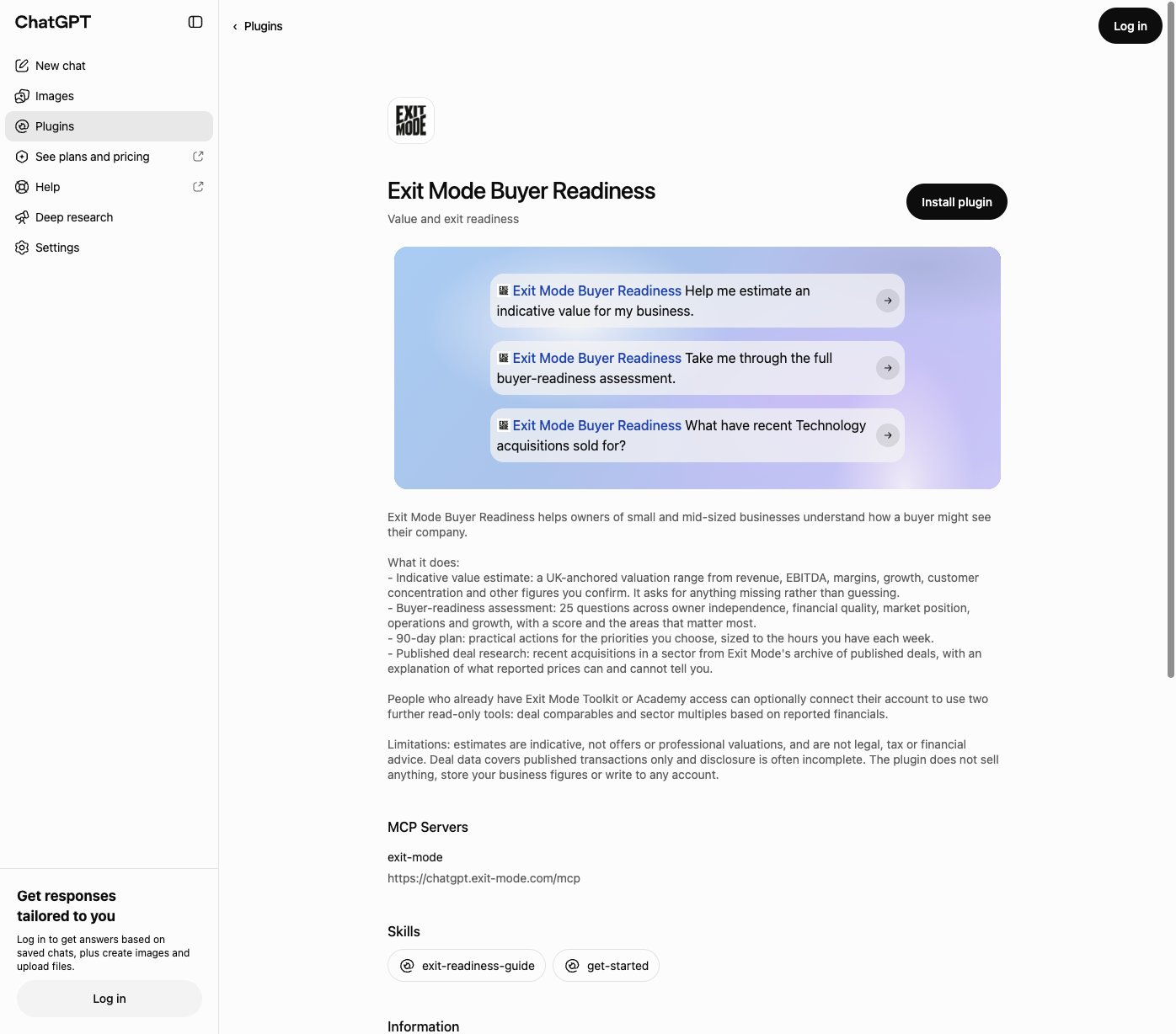
Choose Install plugin and follow ChatGPT's installation steps. If you are signed out, log in to the ChatGPT account where you want to use it. Read any permissions or connection information before continuing. Interface labels may change as ChatGPT updates its plugin directory.
On a managed workspace, your administrator may control whether plugins are available. If you cannot install it, check your workspace settings rather than buying an Exit Mode product to try to fix a ChatGPT restriction.
2. Pick a starting task
The listing offers three starting prompts: estimate business value, complete the buyer-readiness assessment, or research recent Technology acquisitions. Choose the one closest to your immediate question, or open a conversation with the installed plugin and ask for a specific Exit Mode tool.
A useful first message is:
Use the Exit Mode Buyer Readiness plugin. Show me its public tools and help me choose where to start. Ask for missing information instead of assuming it.
If ChatGPT responds with general advice without using the plugin, ask it explicitly to use the relevant Exit Mode tool. Check the tool activity in the conversation before treating an answer as a calculated or researched result. Do not assume every conversational answer is a plugin calculation.
3. Explore an indicative business value
Use the valuation tool when you have reliable financial figures and want a starting range. Revenue, EBITDA, margins, growth and customer concentration can matter, but the tool should ask for the inputs its calculation requires. An absent figure is not zero.
Try this with fictional practice data before using your own numbers:
Use Exit Mode to help estimate an indicative value for a UK business-services company. These are fictional practice figures: annual revenue £1.2m, EBITDA £240,000, 10% annual growth and a largest customer representing 15% of revenue. Ask me for every other required input before calculating. Explain the range, assumptions, and the difference between enterprise value and shareholder proceeds.
Do not ask ChatGPT to fill gaps with an industry average and then present the result as your company's value. Explain adjustments, including whether debt and surplus cash have been included. If you do not know a required number, say so and gather it before proceeding.
The method is UK-anchored and indicative. It is not a live buyer bid, a formal valuation or legal, tax or financial advice. A buyer's view can differ materially once the quality of earnings, working capital, contracts and transaction terms are examined.
4. Complete the buyer-readiness assessment
The assessment covers 25 questions across owner independence, financial quality, market position, operations and growth. Its value is the conversation about evidence and gaps, not simply a headline score.
Use Exit Mode to take me through the full 25-question buyer-readiness assessment. Ask one question at a time, explain the scoring choices, and wait for my answer. Do not invent answers or give me a final score until all required answers are complete.
Answer for how the business operates now, not how you hope it will operate in six months. Where an answer depends on evidence, identify what would substantiate it: documented customer retention, reconciled management accounts or a management team that makes decisions without you.
After the assessment, ask:
Explain the three biggest preparation gaps in my results. Separate what I can address operationally from anything that needs an accountant, lawyer or other adviser.
This remains a self-assessment. It does not certify that your business is sale-ready or that a buyer will accept its figures.
5. Turn priorities into a 90-day plan
Choose a small number of priorities you can act on. A plan built around two genuine constraints is more useful than a long list of generic improvements.
Use Exit Mode to build a 90-day readiness plan around my confirmed priorities: reduce owner dependence and improve the financial reporting pack. I can commit four hours a week. Ask for any missing required information, then give me milestones, owners and evidence of completion.
Treat these as example priorities, not recommendations inferred from your business. Replace them with the gaps your assessment actually identified. Ask which tasks should happen first and what can be delegated. Review progress against evidence rather than ticking a task complete because a document has been started.
Ask for a rendered HTML dashboard
If you want a presentation like the header chart, explicitly request an HTML dashboard after completing the relevant tool. For example:
Create a self-contained HTML dashboard from my completed Exit Mode results. Include real charts using inline SVG, readable labels and warm-white, charcoal and teal styling. Preserve the exact figures, assumptions and caveats. Open a rendered preview if this ChatGPT interface supports it; otherwise provide a downloadable HTML file. Do not simply describe the design or invent missing results.
HTML preview availability depends on the ChatGPT surface. A downloaded dashboard is a separate presentation, not proof that the plugin rendered a component inline. The examples shown here come from a supplied HTML file; its valuation panel is not reproduced because it explicitly says the official estimate remains pending.
6. Research published acquisitions
Use public deal research to understand the kinds of transactions recorded in a sector, the buyers involved and what has been disclosed. It is not a database of guaranteed buyers for your business.
Use Exit Mode to find published acquisitions in UK business services. Show source links and announcement dates, distinguish a whole-company purchase from an asset or stake purchase, and tell me where the price or financials are undisclosed. Do not infer a valuation multiple from missing financial data.
A headline price can represent enterprise value, equity value, an asset price or a maximum including contingent payments. Those are not interchangeable. Ask ChatGPT to explain the basis before comparing deals. A large listed-company transaction is not automatically a defensible multiple for an owner-managed company.
7. What members unlock when they connect their account
Connecting an eligible Exit Mode account adds two member research tools: Deal Comparables and Sector Multiples. These bring the Toolkit's existing research engines into your ChatGPT conversation. You can investigate a result, adjust the filters and ask what the evidence does or does not support without switching between separate screens.
The distinction is important: the public valuation tool gives an indicative starting estimate, while member research helps you examine recorded transactions and qualifying financial evidence. It adds context for a discussion with an adviser, not a guaranteed sale price.
| Task | Public plugin tools | Connected member tools |
|---|---|---|
| Explore your business | Indicative valuation, full buyer-readiness assessment and a 90-day plan | The same public tools remain available |
| Research acquisitions | Named published transactions and source links | Filtered comparables with reported-price distributions and payment-structure mix |
| Examine valuation multiples | No substitute for qualifying transaction financials | Sector analysis using available EV/EBITDA and EV/revenue ratios, with explicit evidence filters |
Connect the account that holds your membership
- Install the plugin in the ChatGPT account you want to use.
- Ask for member deal comparables or member sector multiples. If authentication is required, follow the official Exit Mode sign-in and consent flow.
- Sign in to the Exit Mode account that holds your Toolkit access, normally the account associated with your purchase email. Approve the requested read-only connection, then repeat your research request if needed.
- Check that ChatGPT actually used the member tool before relying on the answer.
The requirement is current Toolkit access on your Exit Mode account. Academy membership includes the Toolkit; other eligible accounts may already hold that entitlement. A free website account, newsletter subscription or paid ChatGPT plan alone does not unlock these two tools. Existing eligible members do not need to buy access again. If your connection reports no access, first check that you signed in to the correct Exit Mode account.
Benefit 1: compare transactions and how buyers paid
Member Deal Comparables can narrow the archive by sector, target country, deal type, consideration type and announcement year. Alongside named transactions, it returns the number of matches, a distribution of disclosed reported prices and the mix of recorded payment structures. Prices can be displayed in GBP, USD or EUR using approximate reference exchange rates.
That helps answer two different questions: what prices were reported, and how was the consideration structured? A cash purchase, an all-share transaction and a deal with contingent payments can have very different implications for a seller even when their headlines look similar.
Try:
Use Exit Mode's member Deal Comparables tool to research UK Technology acquisitions announced from 2024 onwards. Display values in GBP. Show the match count, named transactions, the reported-price range and median where available, and the consideration mix. Keep undisclosed prices separate and explain why these deals may not be comparable to my business. Include the available source links and data-as-of date.
Then follow up:
Narrow that research to cash consideration. Has the sample become too small to draw a useful conclusion? Show the next page of named transactions and explain any change in the price distribution.
A reported-price median is not an EBITDA multiple. Different company sizes, stakes, assets, dates and price definitions can make a price distribution misleading if treated as a valuation benchmark. Use the named deals to investigate context, not just the largest number.
Benefit 2: test valuation assumptions against qualifying financials
Member Sector Multiples goes further where sufficient transaction financials exist. It can analyse available EV/EBITDA and EV/revenue ratios, with filters for sector, geography, date range and transaction size. You can distinguish enterprise-value analysis from reported-price analysis and use actual financials or explicitly broaden the evidence to include forecast figures.
This matters because a generic sector multiple can hide the assumptions behind it. Members can ask which transactions qualify, how many support a result, and which value and financial bases were used before applying any conclusion to their own business.
Use Exit Mode's member Sector Multiples tool for UK Technology transactions. Use enterprise value and actual financials, not forecast figures. Show the qualifying deal count, available EV/EBITDA and EV/revenue statistics, named supporting deals and sources. Explain the sample limitations and data-as-of date. If the evidence is sparse, say so rather than presenting a confident sector benchmark.
Refine it with:
Apply a smaller transaction-size band and explain what falls out of the sample. Keep enterprise value separate from reported purchase price. Do not replace missing financials with estimates.
Not every acquisition has disclosed financials and not every sector has a usable sample. A blank result can mean the evidence does not qualify, not that the tool is broken. Broaden one filter at a time and keep the sample count visible. Never treat a small sample of large corporate acquisitions as a reliable multiple for a much smaller owner-managed business.
Turn the research into a useful conversation
Use the assessment to identify preparation gaps, the member tools to explore market evidence, and the action-plan tool to organise priorities you have confirmed. For example:
Summarise what this research supports, what remains uncertain and the three questions I should take to my adviser. Keep my indicative valuation separate from the transaction evidence.
You can also ask ChatGPT to present returned figures as a table or chart, keeping sources, currency, sample counts and caveats alongside it. That presentation is created by ChatGPT and depends on its available features; a chart is not a new calculation or additional evidence from Exit Mode.
The connection is read-only. It does not buy or sell anything, change your membership, save work into your Exit Mode account or expose all Toolkit features inside ChatGPT. These tools research published deal data, not your private course progress or account files. Their datasets are refreshed snapshots rather than an instant market feed, so check the supplied data-as-of date. Never paste a password into the conversation; manage or disconnect the connection through ChatGPT's settings when required.
Privacy, troubleshooting and sensible limits
Use only business information you are authorised to share. You can explore the workflow with fictional figures first. Review Exit Mode's plugin privacy policy, the listing's data-sharing notice and your ChatGPT settings before providing sensitive information. The plugin's read-only design does not mean your conversation is private from the host platform.
If installation is unavailable, check your ChatGPT account or workspace permissions. If a member tool asks you to sign in, use the official connection flow; buying the Toolkit is not required for the four public tools. If research has sparse results, change one filter at a time and keep the evidence limitations visible rather than asking ChatGPT to invent a fuller set.
For general installation and availability information, use OpenAI's plugin documentation. If a connection fails, contact Exit Mode support with the error wording and approximate time, without sending passwords or private financial records.
Start with one useful question
You do not need to do everything in one conversation. Start with the task that removes your biggest uncertainty, confirm the inputs, inspect the result and choose one next action.
Open Exit Mode Buyer Readiness in ChatGPT, or browse the Toolkit for the standalone resources. Prefer Claude? Use the Exit Mode Claude connector guide.
About Adam J. Graham
Adam is a twice-exited founder and the author of the Exit Mode business books. He writes about preparing, valuing and selling founder-led businesses. Read his background.
Free tool
Start your next exit-planning conversation in ChatGPT
Open the published Exit Mode Buyer Readiness listing, install the plugin and start with one of the prompts in this guide. Its four public tools do not require an Exit Mode purchase.
Open Exit Mode in ChatGPT