
Practical guide
How to use the Exit Mode connector in Claude
Use Exit Mode in Claude to explore business value, assess buyer readiness, build a 90-day plan and find published acquisitions. Setup steps and example prompts.

The Exit Mode Claude connector lets you explore an indicative business valuation, complete a buyer-readiness assessment, build a practical 90-day plan and research published acquisitions without leaving your Claude conversation. The four public tools are free to use through the connector. You need access to connectors in your Claude account, but you do not need an Exit Mode login or paid membership.
The useful difference is not having another chatbot tell you that preparation matters. It is being able to work through a defined calculation or assessment, ask what the result means and decide on the next action in the same conversation.
This guide explains how to connect it, what to ask and how to use the answers without treating an estimate as a buyer's offer.
See what you can create with the results
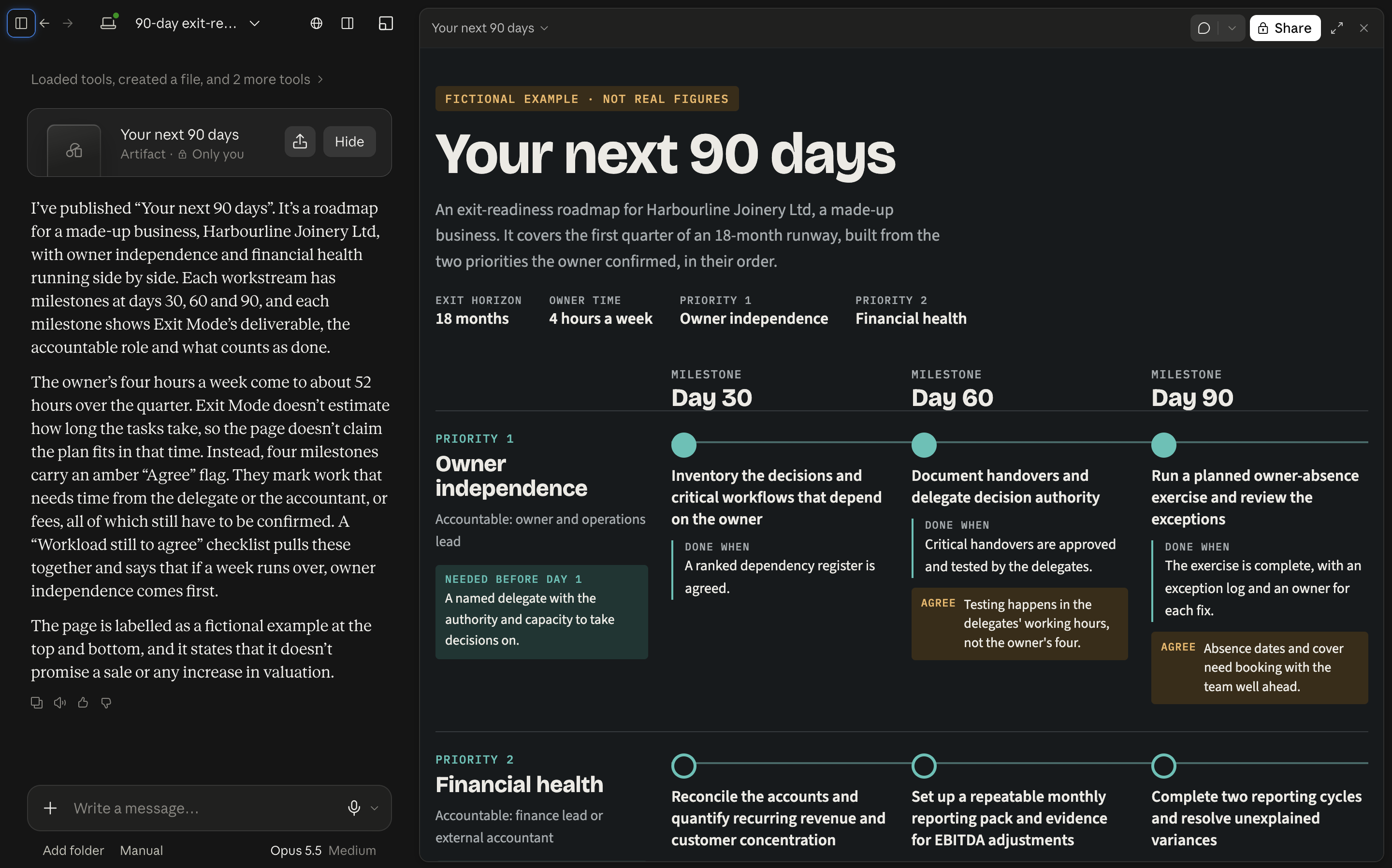
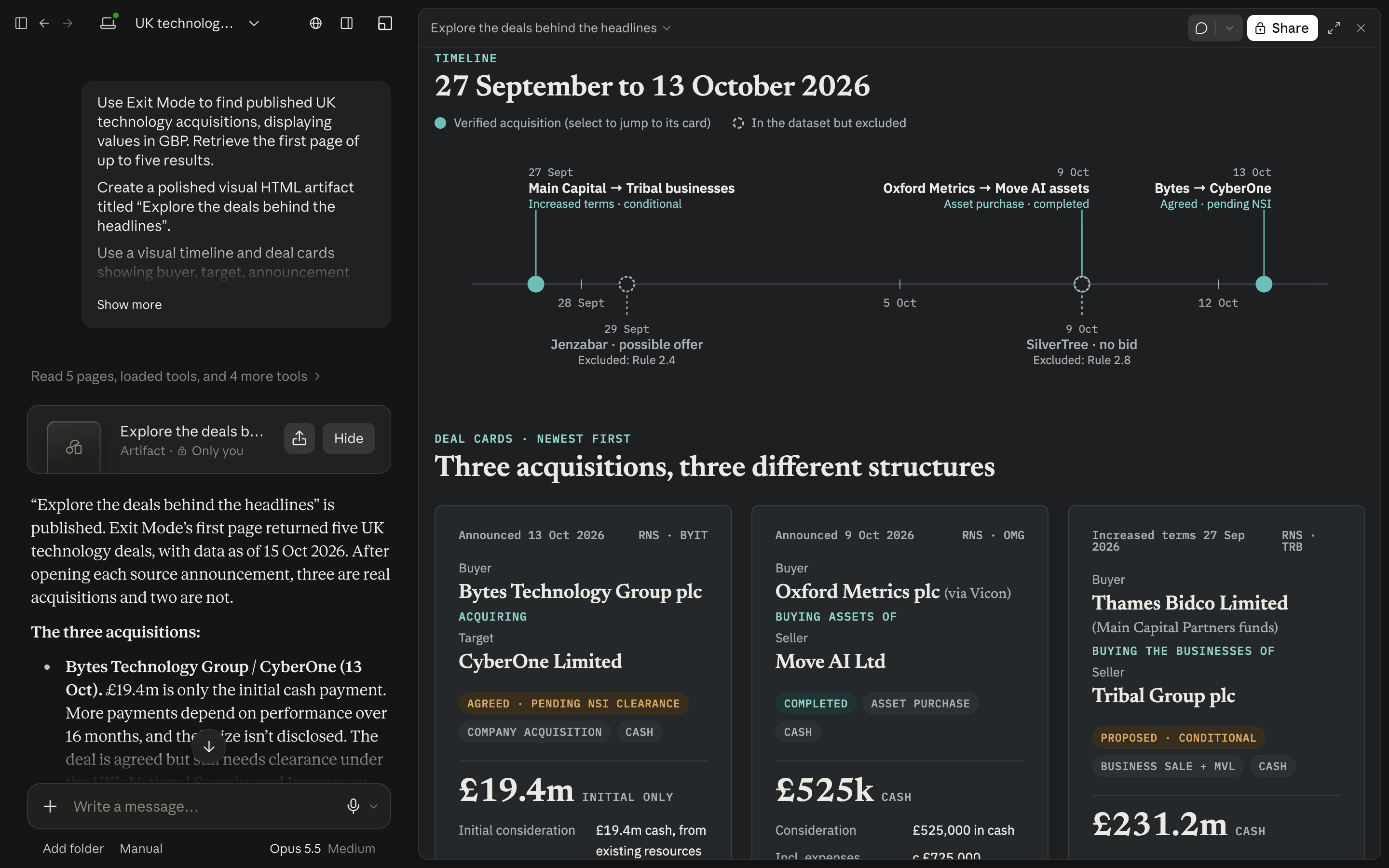
These screenshots show real examples created in Claude using Exit Mode tool results. Ask Claude to turn the output into a visual HTML artifact: a valuation-range chart, a readiness dashboard, a timeline or a set of deal cards. The connector supplies the calculations and research; Claude creates the visual presentation when you request it. These are examples, not fixed screens built into the current connector.
The valuation, readiness and planning examples use fictional business inputs. Your results and visual layout will depend on the information you provide and Claude's response.
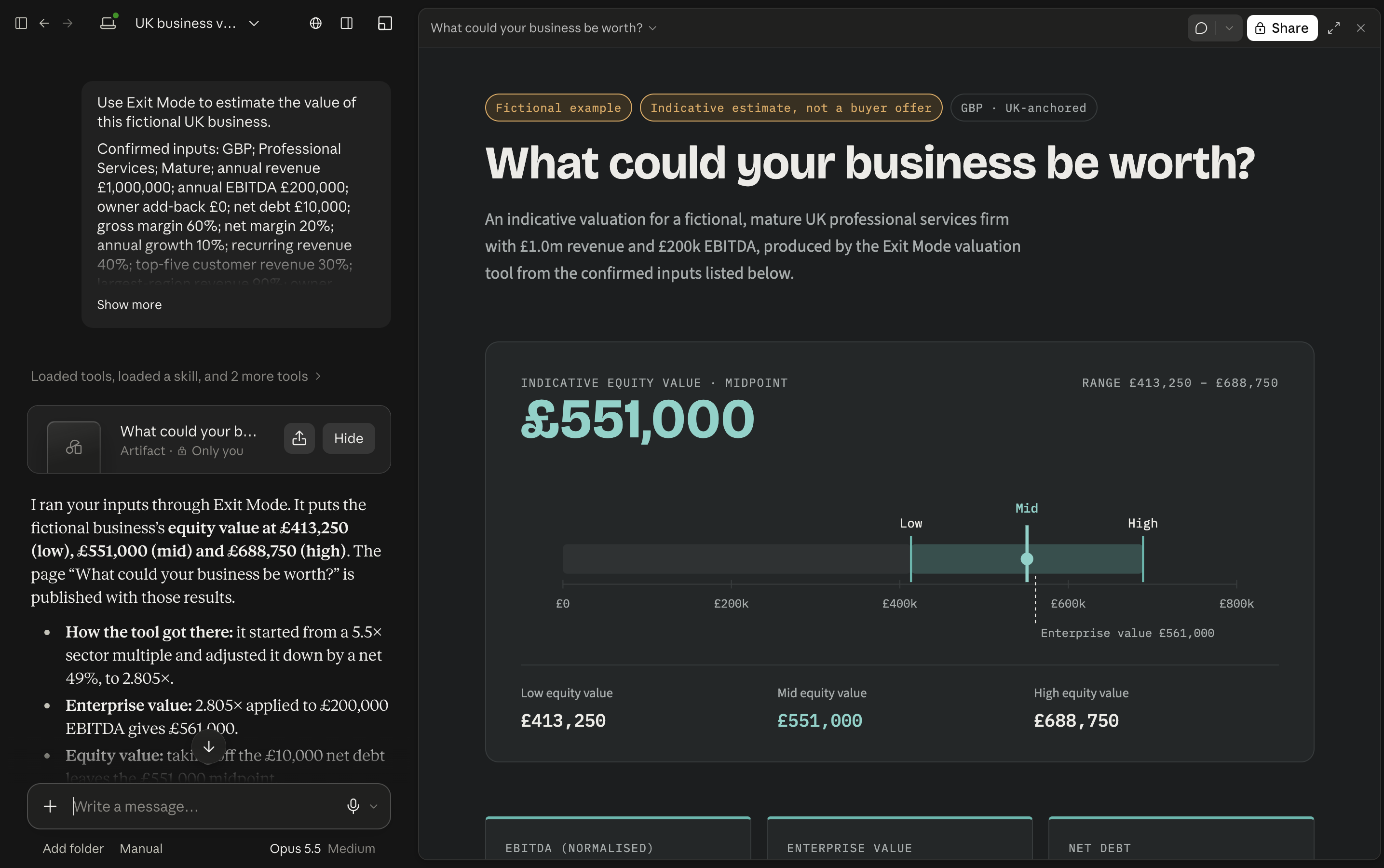
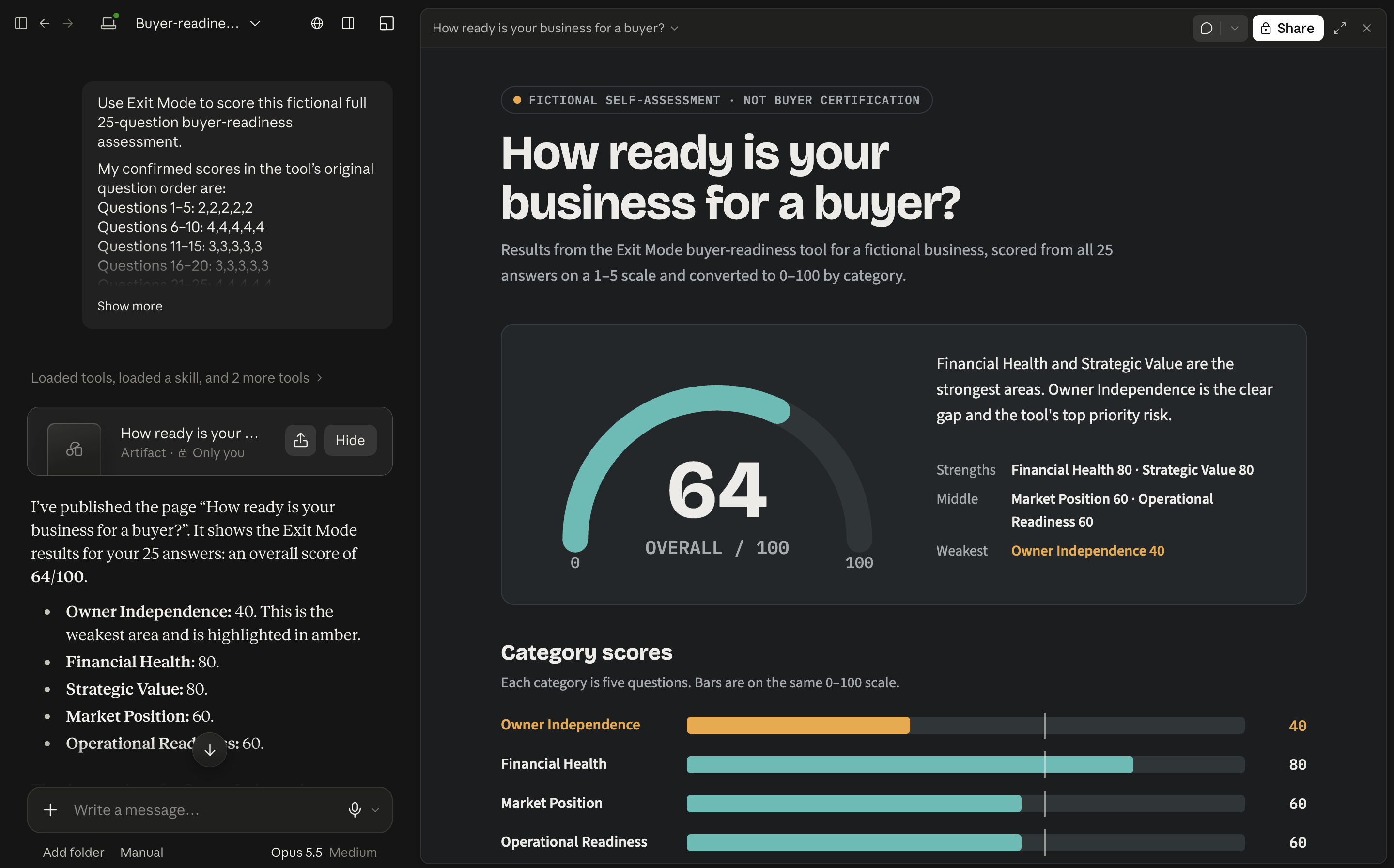
To try a visual response, add this to your prompt:
After using the Exit Mode tool, create a visual HTML artifact from the results. Use a clearly labelled chart or timeline, keep the assumptions and limitations visible, and do not invent missing data.
What the Exit Mode Claude connector can do
The initial release has four read-only tools:
| Tool | Use it when you want to | What to remember |
|---|---|---|
| Business valuation | Explore an indicative value range using confirmed financials and business risks | It uses a UK-anchored methodology, not a live bid or formal valuation |
| Buyer-readiness assessment | Work through all 25 questions and understand preparation gaps | A full assessment needs all 25 answers; a few comments are not a completed score |
| Exit-readiness plan | Turn confirmed priorities into a practical 90-day programme | The plan is a starting framework, not a promise of a sale or price increase |
| Public deal comparisons | Find published acquisitions relevant to a sector or business | A reported purchase price is not automatically enterprise value or a suitable SME comparable |
The connector does not buy or sell businesses, charge a card or make changes to your accounts. This public Claude release does not unlock the member-only deal-comparison and sector-multiple tools offered elsewhere in Exit Mode.
How to connect Exit Mode to Claude
- Sign into Claude. On the web or desktop app, open Customize → Connectors.
- Find Exit Mode. Select Discover, search for Exit Mode and open its directory listing.
- Choose Connect to Claude. Exit Mode's public connector does not require a separate sign-in to our service. You should not need to buy an Exit Mode product to connect.
- Open a conversation and enable it. Use the + menu in the message box, choose Connectors and make sure Exit Mode is switched on for that conversation.
- Ask a question that uses a tool. Claude may ask permission before the tool runs. Review the request and allow it if you want to continue.
These are the steps described in Anthropic's connector setup guide. Interface labels can change, so use that guide if your version looks different.
On a Team or Enterprise account, an organisation owner may need to enable the connector first. If you see Request rather than a connect button, follow your workspace's approval process. Connecting it once and enabling it in the current conversation are separate steps.
Start with a valuation question, not a made-up multiple
A useful valuation conversation starts with the information you can support. Claude should ask for the inputs the tool requires rather than quietly assuming missing debt, owner costs or profit figures are zero.
Try this prompt:
Use the Exit Mode connector to help estimate my business value. I run a UK agency with £2 million annual revenue and £400,000 EBITDA. These figures are illustrative. Ask me for every other required input before calculating, and explain the assumptions and limitations in the result.
You have deliberately not provided a complete valuation case. The next useful response is a set of questions, not an instant number assembled from guesses.
Have your financial period, revenue and earnings basis ready. Be prepared to distinguish reported EBITDA from proposed owner add-backs, and confirm the debt and risk information requested. If you do not know an input, say so rather than inventing one to finish the conversation.
After the tool returns a result, ask:
Which assumptions have the biggest effect on this range, and what evidence would I need to check them? Separate the tool's calculation from your interpretation.
The result is a preparation aid. It is not automatically what you personally take home after debt, cash adjustments, fees, tax or conditional payments. Our business valuation guide explains those distinctions.
Use the full readiness assessment to find your next priority
A business can have attractive earnings and still be difficult to transfer. Founder dependency, customer concentration, weak records or unclear responsibilities can change the discussion with a buyer.
Ask Claude:
Use Exit Mode's complete 25-question buyer-readiness assessment. Ask the exact questions one at a time, show the answer options and record only the answer I choose. Do not calculate a final score until all 25 answers are complete.
Answer for the business as it operates today, not the version you hope to have in a year. If the team can run operations without you but every important customer still calls your mobile, those are different issues. Give each question its own considered answer.
When the assessment is complete, ask for the category breakdown and one or two priorities you recognise. You can disagree with an interpretation or explain missing context. The point is to choose useful work, not to chase a perfect score.
If owner dependency stands out, the next action might be documenting a handover and testing it in practice. The owner-independence guide gives a practical way to start.
Turn a confirmed priority into a 90-day plan
A long list of weaknesses is not an operating plan. Choose a priority you agree is material, then ask for work that someone can own and complete.
For example:
Use the Exit Mode connector to build a 90-day plan focused on financial health. I can dedicate four hours a week and would like to explore an exit in around 18 months. Ask me to confirm the priority and any other required inputs. Make the next actions and completion measures clear, without promising a valuation uplift.
Review the plan before acting on it. Do the proposed owners exist in your team? Can the deliverables be completed with the time and information available? Does a task need input from your accountant or lawyer?
Pick a first deliverable that produces evidence, such as a supported earnings bridge or a consistent financial reporting pack. Schedule a review of what changed rather than accepting an automatically generated timetable as a commitment.
Research deals without confusing headlines with comparables
Published acquisitions can help you understand which businesses attract buyers. They do not establish that every business in the same broad sector deserves the same price or multiple.
Try:
Use Exit Mode to find published UK technology acquisitions. Show up to five relevant transactions with their available source links and data dates. Explain which facts are missing and why these deals might not be comparable to a small agency. Do not infer an EBITDA multiple from a price alone.
Check the underlying sources. Look at the target's activities, geography, scale, transaction date and the basis of any disclosed value. A minority investment, an asset purchase and a whole-company acquisition do not necessarily describe the same thing.
Ask Claude to separate what the source reports from what it is inferring. A useful answer can be “there is not enough information to make that comparison”. The earn-out guide also explains why a headline price and cash at completion can be very different amounts.
If Claude is not using the connector
First check that Exit Mode is connected to your Claude account and switched on in the current conversation. Then ask explicitly to use the Exit Mode connector and name the task.
If Claude asks for more information, that may be the correct behaviour. The valuation needs its required inputs, and the readiness score needs the complete assessment. Ask what is missing rather than requesting that Claude fill the gaps itself.
If a tool is blocked, check its permissions on the connector's settings page. If the directory says Request, ask the workspace owner to enable it. Neither situation means you need an Exit Mode paid membership.
What about business information and privacy?
The connector receives the inputs needed for a tool call, not automatic access to your email, bank account or Exit Mode purchase history. Our application processes tool arguments transiently rather than intentionally storing them as customer records. Hosting and usage-control providers still process operational metadata, and Claude handles your conversation under your Anthropic account settings.
Use only information you are authorised to share. Aggregate or illustrative numbers are a sensible way to learn the workflow before using business information. Customer names, employee records and confidential sale documents are not needed to try the prompts in this article.
Common questions
Is the Exit Mode connector free?
The four public Exit Mode tools do not require an Exit Mode purchase or membership. Claude's own plan features, usage limits and workspace settings still apply. Free Exit Mode access does not mean unlimited Claude usage.
Is this the same as asking Claude for general exit advice?
Not quite. A connector call uses a defined Exit Mode engine or published-deal lookup. Claude then explains the output in the conversation. Ask it to make that distinction clear rather than treating all surrounding prose as a tool-generated result.
Can I use the tools without Claude?
Yes. The valuation calculator, readiness scorecard and deal comparator are also available on the Exit Mode website with email access. Use whichever workflow helps you make the next decision.
General business preparation guidance. Tool outputs are indicative and depend on confirmed inputs, methodology and available source data. They are not legal, tax, investment or transaction-specific advice.
Free tool
Put your next exit-planning question to work in Claude
Add the free Exit Mode connector, turn it on in your conversation and start with one of the prompts above. No Exit Mode account or purchase is needed.
Connect Exit Mode to Claude